
Producing one itinerary took my client hours, so I decided to build a PDF generator for them in Claude. The results came back looking like a designer had laid it out. This is how I did it and the ten (yes TEN) versions it took me to get there.
Safari & City is a hands-on business that helps UK travellers plan their South African trips. It is a personalised service that has a lot of one-to-one client contact. The team produces a custom, beautifully laid out itinerary for each client. It carries all that planning and must look the part.
Even though I had originally built a company brand kit in Canva and a fully formed design template for this task, it still took many hours. Each time team members duplicated the template, the inevitable variable trip details had to be accommodated, and small changes broke the design little by little. It wasn't a solution, and I had to go back to the drawing board.
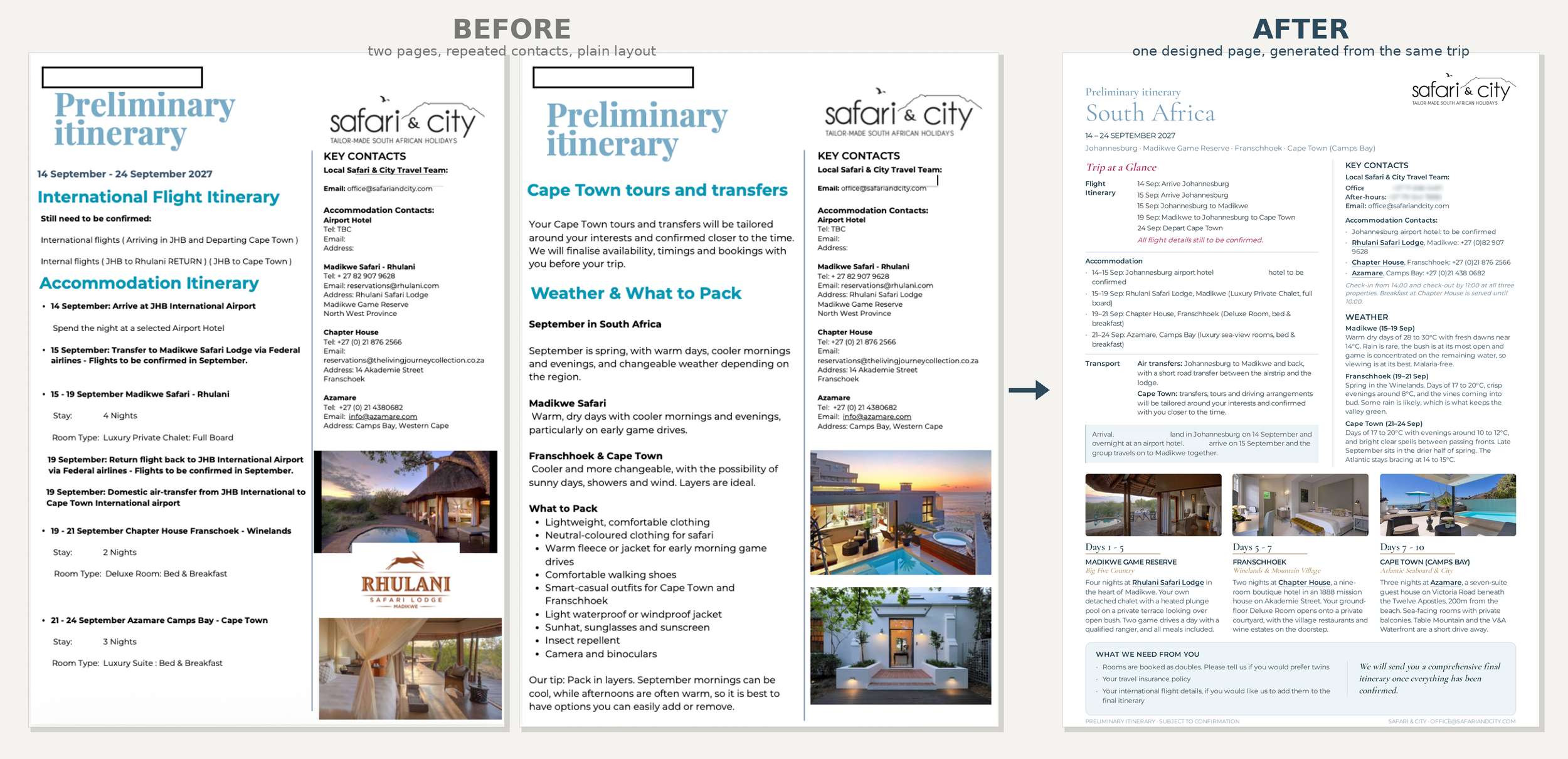
Before and after. The old itinerary ran to two pages with the same contacts repeated. The original Canva template looked much better, but had already been degraded over time. The PDF generator produced a single designed page, keeping the look and feel consistent over multiple tests. The best part is that it also adjusted copy intuitively to keep the integrity of the design. Layout of this image courtesy of Claude.ai.
Why it was such a challenge
Every Safari & City client is different, and every itinerary is bespoke. A trip with three legs (stops) or five can't use the same layout, let alone the same copy. Copy length varies too. A paragraph that sits neatly on one property can push the page over on the next, shift photos, or require some manhandling because of the domino effect any changes have.
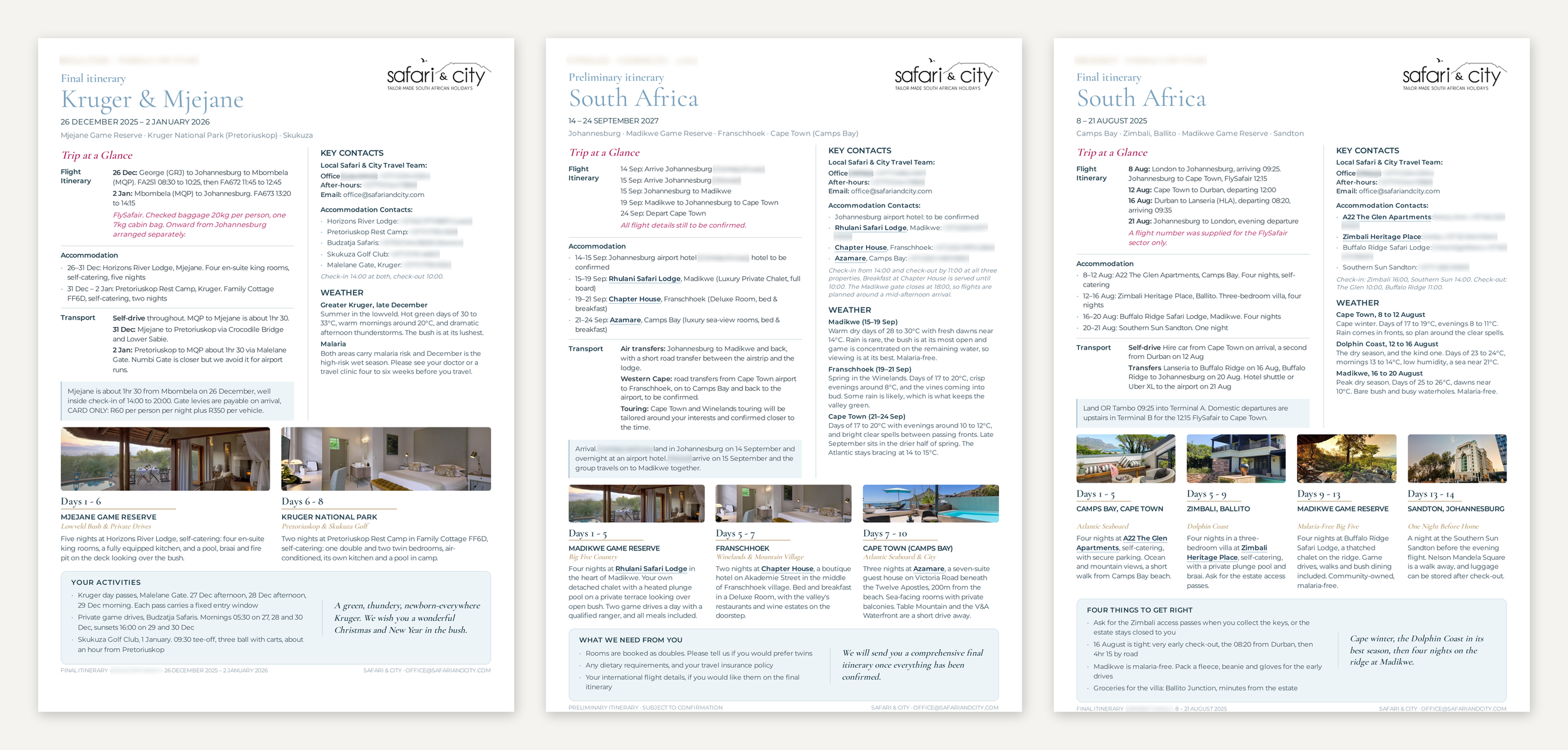
Three client itineraries produced by the same script, side by side, the page adapting from a two-stop trip to a four-stop trip.
Bespoke and AI automation don’t go hand in hand.
When it comes to automation, this is a major challenge for all personalised service companies. The human part is what makes your service special; however, it is important to see whether some aspects of your operations can be automated, especially if it's a huge, time-consuming task. After analysing the problem, i.e. every itinerary was a redesign job dressed up as a copy edit, I mapped out what I believed could be a solution using AI (with strict rules and clear guardrails, of course).
The Key -separate the writing from the drawing.
What worked was splitting the job by what changes and what is fixed. The design sits in a separate script that never changes: spacing, type, image placement, etc. One leg or five, the page rebuilds around how many there are.
The model does not 'draw' the page. It fills in a specification: which properties, which dates, which photos, what the description says. A separate script then takes that specification and draws the page, as a designer would do.
The split is not just content in one box and design in the other. The two halves have to agree on space. The script knows how much room every block has, down to the character, and it hands that ‘budget’ to the model before anything is written. So a property description on a four-leg trip is written shorter than the same description on a one-leg trip because the space it has to live in is different. When you write first and fit it afterwards is how you end up back in Canva.
Now every client's bespoke itinerary comes out perfectly designed according to their brand guidelines, even if the content is totally different. The design elements always stay intact no matter what the trip variables are.
How I did it
Claude project setup
I created a new Claude project and called it Safari & City Itinerary Builder. I do every new client itinerary in a new chat inside it, and each one opens already knowing the house rules. Nothing has to be re-explained, which used to be the most frustrating part of working this way.
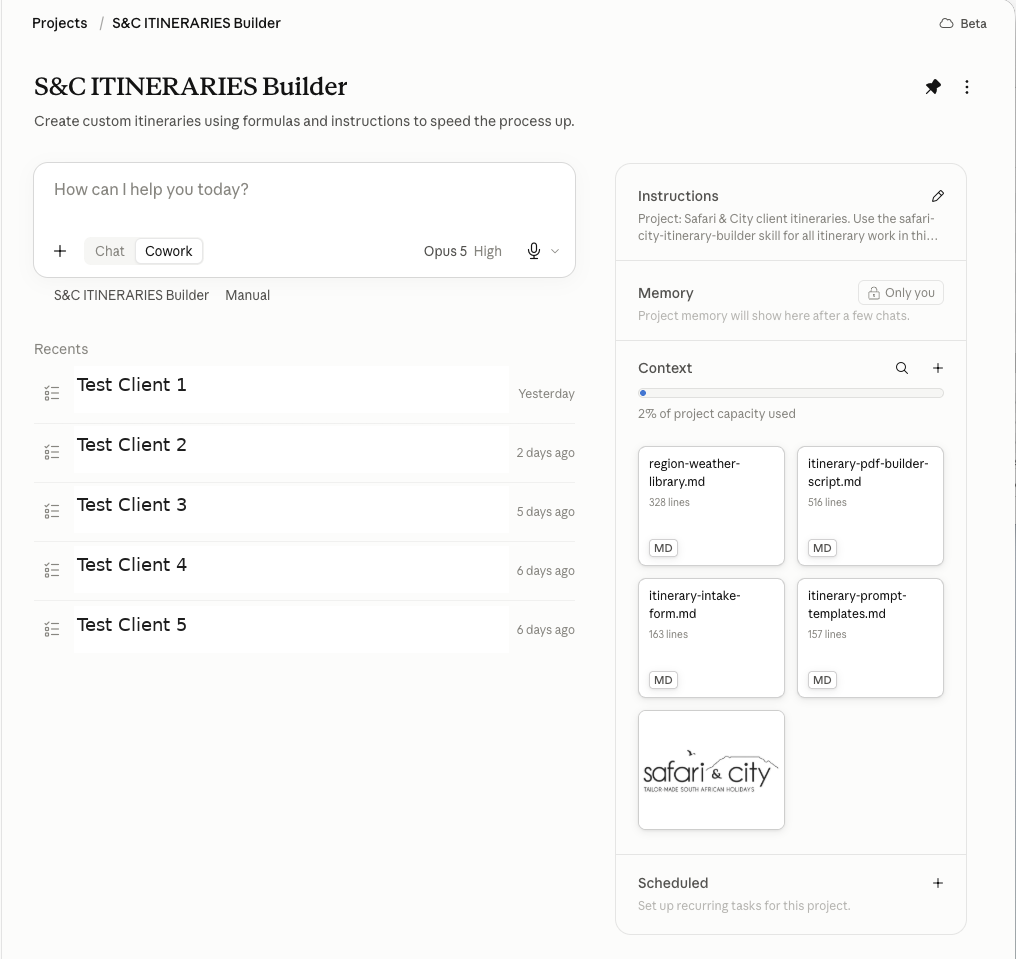
Inside the build. Here is an anonymised screenshot of how I set it up. The Project with the all-too-important, carefully crafted Project instructions. The four project docs on the right: weather library, build script, intake form, and client logo. The prompt template doc was also added but as a personal resource.
Skill build
This was new to me. Claude built a specific ‘skill’ that holds the brand's style, layouts, and hard rules - used by every chat. A skill is not a document. Think of it as a folder holding the method for one job: the written instructions and the files that show Claude how to do it. Claude loads it automatically when a new job comes up.
Project instructions
You have to be strict and clear. It was told never to invent a figure, a time, a phone number or a room detail, and to flag any gaps that needed my confirmation.
Project docs
It was important to keep these as narrow as possible.
I built a weather library covering five South African regions, each with twelve-month tables. It included instructions on which end of a temperature range to quote for client copy, as it directly affected packing advice, and whether the region carries a malaria risk. When a new region comes up as new itineraries are built, the library is updated, so it grows with the business.
Alongside it is an intake form that holds everything an itinerary needs. It has nine sections covering the stage and layout, who is travelling, the trip itself, each stay, flights and transport, the S&C contact person, what they still need back from the client, and anything else worth knowing. In practice it does three jobs: 1) it is the list the folder contents get checked against, 2) it sits behind the ‘gap flags’ on the first output, and 3) it is the fallback when a folder has missing information or the information arrived by email instead of being filed properly.
Finally, the company logo - so it stopped asking for it in every new build.
Script
This is where the magic happens. The script renders an A4 PDF with live links (either a Google map for quick directions or the property's website). The number of legs sets the column widths. Photos are cropped once, to the exact shape of the box they are going into (the joy). The type auto-fits down to a floor, and if the content still will not fit, it stops and tells me to cut copy rather than shrinking everything to an unreadable font size.
The Result
Two stages, both off the same engine. A first draft now takes about 15 minutes, then a check and a few edits are really quick after that.
The preliminary itinerary is the client's first view of the planned trip, summarised on a single readable page, with anything unconfirmed left marked TBC.
The final itinerary is the same overview once everything is confirmed, and the header changes to match. It can stay a one-pager or run to two or three pages if there is more to pull from the client folder as the trip firms up. This includes fuller accommodation descriptions and more images, recommended day trips and activities where they have been discussed, and notes on tipping, gate fees, special transfers, late check-outs, or any other helpful info to have on hand.
The cherry on top - If there is white space left on a final layout, it fills it with a packing list drawn from the weather library for that time of year.
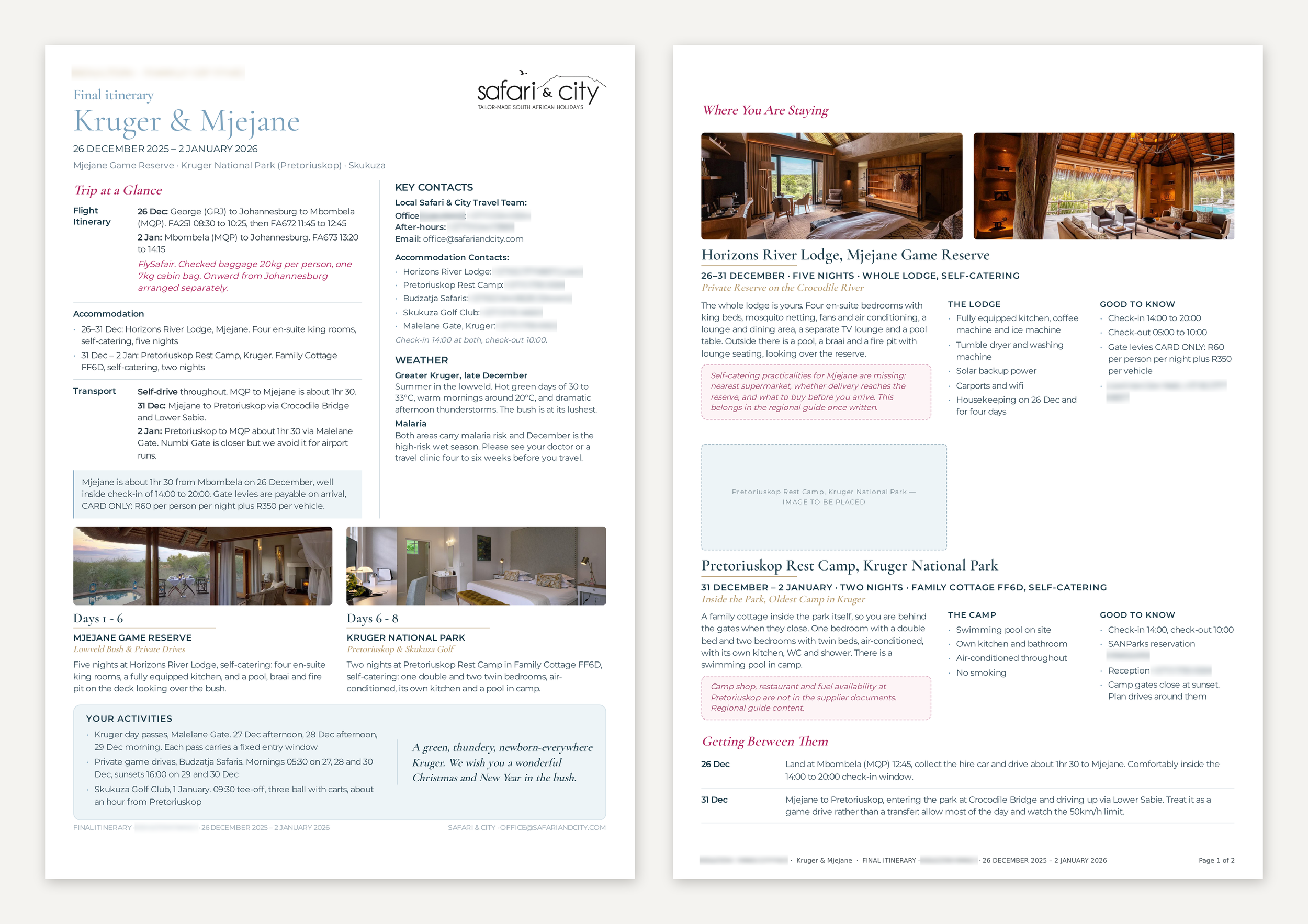
A two-page, almost perfect, first render of a final itinerary, showing that one of the photos it pulled from the folder could not be used. That prompted me to provide a new one. The pink boxes are the gap flags, where the builder tells me what information is still missing rather than filling it in itself.
How a job runs now
The Safari & City client contact sets up a client folder in Google Drive as the trip comes together. No personal client details go in, but everything else does: flight information, accommodation details, booking confirmations and notes, all filed in Google Drive or Dropbox. Photos go into an image folder, labelled by property.
I give the builder access to the folder and say whether I want a preliminary or a final itinerary. It reads booking confirmations, checks the dates and flights, pulls accommodation details from the official property URL provided, writes the descriptions, places the photos and lays out the page.
Anything missing comes back flagged directly on the layout. Where a photo is needed, it drops in a placeholder so I know to go and find one. I fill in the info gaps and hit regenerate.
Important Rules
Source control is the one to get right. For this job, I mandated three sources: the client folder, the formal property URLs and the weather library. That rule exists because, on one of my tests, a completely different trip's reservations email address showed up as a stray text element.
Photos are supplied in the folder. The AI never sources them, but they must be labelled properly so it pulls them into the right place.
What broke
Testing was where the real work happened. The build script and the skill were updated and refreshed many times as issues popped up during testing. Here is a taster of issues that came up.
The fonts initially came in as variable fonts and resolved to ‘Thin’, so the first documents were close to unreadable until they were flattened to static weights.
Letter spacing broke words apart on import and gave me "MadikweGameReserve" or "Iti ne ra ry".
Photos were being cropped twice, once in processing and again in layout, which threw away most of every frame.
The trip columns were hardcoded to thirds initially, so anything that wasn’t a three-stop trip fell apart.
An escaping fault printed the raw HTML code for an ampersand on the face of a document, so the contacts heading showed the letters "amp;" between Safari & City.
And in some cases, a content block was split by a page break in a way that looked wrong, which turned out to be the stylesheet rather than the renderer.
Using older, completed trips as the test material made these issues quick to find, because I already knew what it needed to look like. Each fix went back into the script and the ‘skill’.
If you take one thing from this
It takes longer than you think. I worked on this for three days, and I already had their brand system from previous work. This same build could be used for a proposal, a quote, a treatment plan, a tender response: anything that gets rebuilt repeatedly. If I can do it, so can you, but it requires a healthy dose of patience. If you'd rather skip that and have it just work, this is the kind of thing I now map out and build for clients if it makes sense.
